JS8 / JTTY Subspace Edition

Everything JS8 does.
Four times faster, and easier.

A free and familiar drop-in alternative to JS8Call: 64 WPM Subspace mode, a mesh network that relays around poor conditions, a live spots map, and JTTY conversations across the whole waterfall. New usability features are 100% compatible with every JS8 program on the air.

Windows, macOS, Linux and Raspberry Pi. Open source (GPLv3). Installs beside your current JS8 program.

64 WPMSubspace mode, 4x JS8 Normal
no clock sync needed in Subspace mode
Zero-configon-air in 2 minutes
100%compatible with every JS8 program
For JS8

Faster messages. Longer reach. Less waiting.

Subspace speaks plain JS8 to everyone, and adds a faster mode and smarter tools for when you meet another Subspace station.

Subspace mode, 64 WPM

Four times JS8 Normal, good to about -16 dB. A fifth speed beside Slow, Normal, Fast and Turbo.

No clock to keep right

Subspace mode syncs to the signal itself, not to clock time, so clock drift never stops a decode.

tribbleNet mesh

When the band won't reach, auto-route finds a relay path through stations it has heard, or you pick the hops yourself on the map. Any JS8 program can relay.

Reliable delivery

Messages, files, web links and ICS-213 forms arrive complete, with automatic repeats until every part is confirmed.

Hailing and Typing...

Announce yourself in under 4 seconds with no flood of replies, and let the other station know a reply is on its way.

Spots, live

A built-in map of who hears you, updated every few seconds, with PSKReporter spots that are not rate-limited.

For JTTY

JTTY conversations, the easy way.

JTTY is a keyboard-to-keyboard mode for real conversations. Subspace makes it simple to find people and talk with them.

  • Hears the whole waterfall. Subspace decodes every offset, full-time. WSJT-X decodes JTTY only from 1200 to 1800 Hz unless you move it.
  • No WSJT-X 80-character limit. Just keep typing, and send long messages easily.
  • Text appears as it arrives. Each message grows on screen piece by piece, so you can read along.
  • Click once to address. Pick a station and every message goes to it until you deselect.
  • Every station in its own window. Station Monitor shows one conversation at a time, with no noise from the rest of the band.
  • Logs the way LoTW expects. QSOs are logged as MFSK / JTTY, matching WSJT-X.

New to JTTY?

A step-by-step guide takes you through a complete QSO, click by click. Tip: call CQ between 1200 and 1800 Hz to reach stations running WSJT-X, then move to a quiet spot together.

Read the JTTY how-to
See it

Built for seeing the band at a glance.

Click any screenshot to see it full size.

Spots Map

Who hears you, and the way through.

Every station that heard you, colored by signal strength, with lines to each one. Add PSKReporter spots, choose 5 to 60 minutes, pan and zoom.

  • Auto-route: when a station is out of reach, Subspace finds a relay path through stations it has heard and sends your message along it, hop by hop. Shown here at 30x speed.
  • Manual route: point and click stations on the map to build a relay path with any number of hops.
  • Start a QSO by clicking a station on the map.
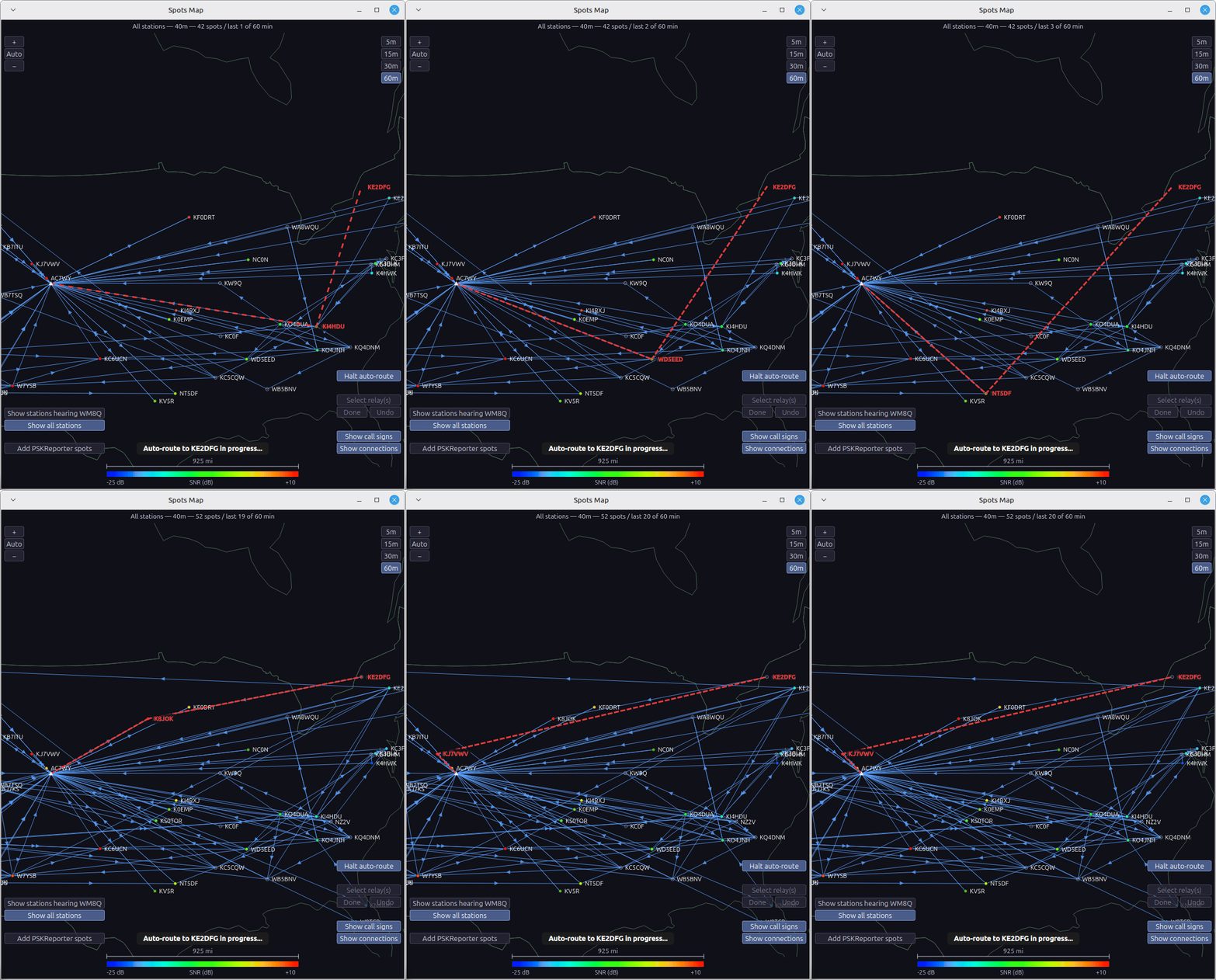
Spots Map animation: automatic route discovery finding a multi-hop relay path, 30x speed
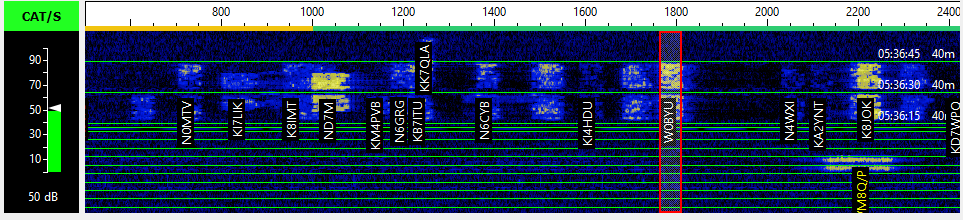
Labeled waterfall

Every signal, named.

Call signs are written right on the waterfall, color coded, at the offset and moment each station was heard. Click a label to start a QSO.

Waterfall with call signs labeled at each signal
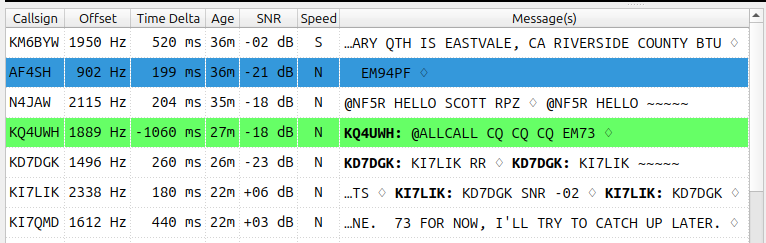
Band Activity

One line per station.

Band activity organized by call sign instead of by frequency, so a busy band reads like a list of people. Calls to you are highlighted, and finding a call sign is one search away.

Band Activity window listing one call sign per line
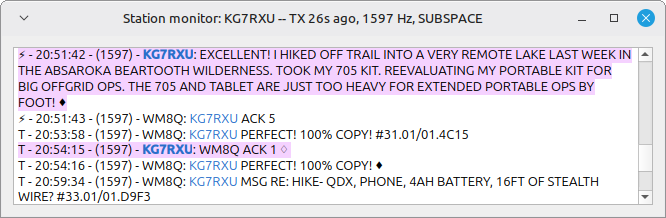
Station Monitor

One conversation, nothing else.

Open a window for any station and follow just that conversation, in both directions, with your own messages shaded. Open as many as you like.

Station Monitor window showing a single conversation with KG7RXU
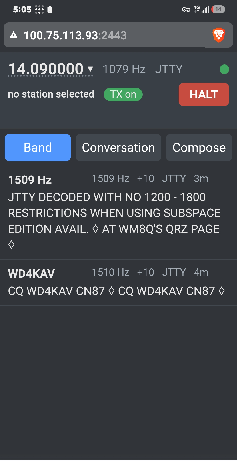
Remote

Your station, on your phone.

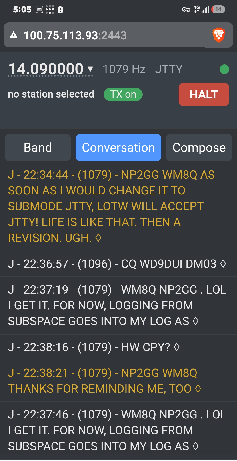
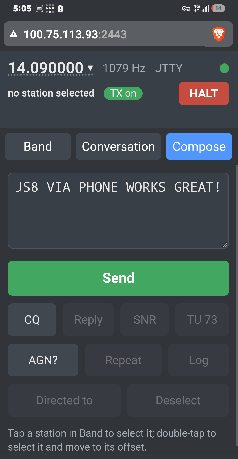
Read the band, follow the conversation and send, from any phone or PC browser. Nothing to install on the phone.

Band activity and conversation CQ, Reply, SNR, Send JS8 and JTTY Home Wi-Fi or cell network Easy QR code log-in
Phone remote: Band tab listing JTTY stations with offset, SNR and age
Band activity
Phone remote: Conversation tab with a JTTY QSO
Conversation
Phone remote: Compose tab with Send, CQ, Reply, SNR and other buttons
Compose and send

Phone setup instructions

Zero risk

Keep your current setup.

Subspace installs to its own folder and never interferes with your existing JS8 program or settings. Run one or the other, whenever you like. It talks to every JS8 station on the air; the extra speed and tools kick in when you meet another Subspace station.

Windows64-bit installer
macOSApple silicon and Intel
LinuxUbuntu / Mint .deb
Raspberry PiDebian 13 "Trixie"

Get on the air with Subspace.

Free and open source. Questions, ideas and how-tos are in the Subspace discussion group.